I’ve been managing social media accounts for nearly a decade now. When I first started, scheduling posts meant spreadsheets, sticky notes, and a lot of late nights. Fast forward to today, and the landscape looks completely different.
The integration of artificial intelligence into social media management has genuinely transformed how I work and I’m not saying that lightly. But here’s the thing: not every shiny new tool delivers on its promises. Let me break down what’s actually useful, what’s overhyped, and how to choose the right solutions for your specific needs.
Why AI Has Become Essential for Social Media Managers

Managing multiple platforms used to be manageable. Post once or twice daily, respond to comments, call it a day. Now? Algorithms demand constant engagement, audiences expect immediate responses, and content formats multiply faster than anyone can keep up.
Last year, I worked with a small e-commerce brand running accounts on Instagram, TikTok, Facebook, LinkedIn, and Pinterest. The owner was burning out trying to handle everything manually. Within three months of implementing the right tools, she cut her social media workload in half while actually increasing engagement.
That’s the real promise of these technologies not replacing human creativity but amplifying what we can accomplish.
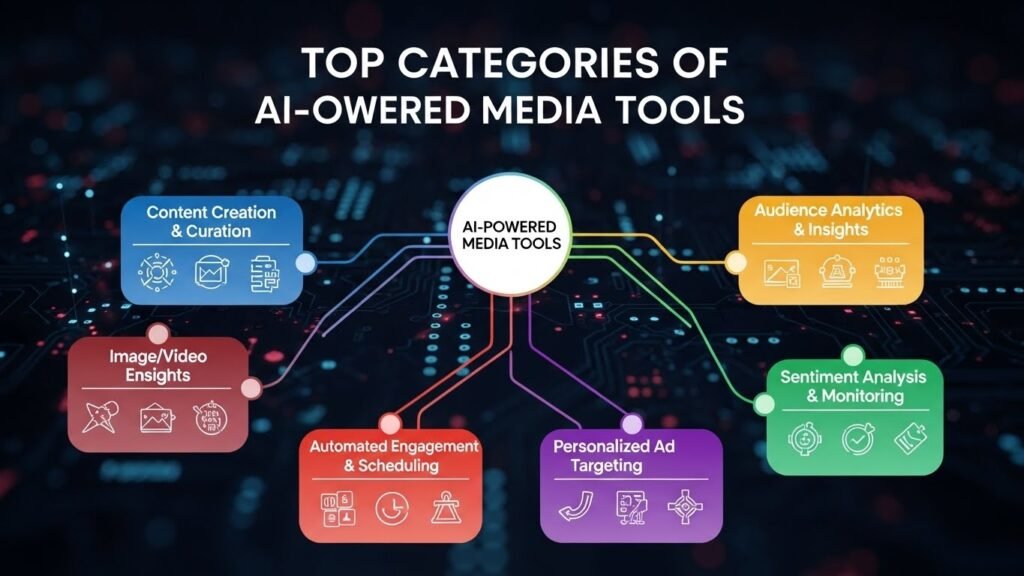
Top Categories of AI-Powered Social Media Tools
Content Creation and Optimization
Tools like Jasper, Copy.ai, and Canva’s Magic Write have become staples in my workflow. They don’t write perfect posts out of the box anyone who tells you otherwise is selling something. But they’re incredible for generating first drafts, overcoming creative blocks, and suggesting alternative angles I might not have considered.
For visual content, Canva’s suite has improved dramatically. Their background remover, text-to-image features, and design suggestions save hours every week. I still tweak everything manually, but starting from a strong foundation makes a huge difference.
Scheduling and Publishing Platforms
Buffer, Hootsuite, Sprout Social, and Later have all incorporated predictive analytics. These platforms now suggest optimal posting times based on when your specific audience is most active not just generic best practices.
What impresses me most is how Later handles Instagram content planning. Their visual planner combined with performance predictions helps me map out weeks of content while seeing exactly how the grid will look.
Social Listening and Analytics
Brandwatch and Mention have become sophisticated enough to detect emerging trends before they peak. I’ve caught several viral opportunities simply because automated alerts flagged unusual activity around relevant keywords.
Sprout Social’s analytics dashboard deserves special mention. Understanding not just what happened but why sentiment analysis, competitor comparisons, audience demographic shifts informs strategy in ways raw numbers never could.
Customer Engagement and Chatbots
ManyChat and Chatfuel power most automated responses I’ve implemented for clients. They handle frequently asked questions, qualify leads, and maintain engagement when team members aren’t available. One restaurant client reduced response time from six hours to under two minutes for common inquiries.
That said, there’s a balance to strike. Over-automation feels impersonal. I always recommend setting up seamless handoffs to human team members for complex issues.
Choosing the Right Tools: Practical Considerations

Budget matters enormously. Enterprise solutions like Sprout Social offer incredible depth but cost hundreds monthly. Smaller operations might achieve 80% of that functionality combining Buffer’s free tier with free versions of other specialized tools.
Consider your team size too. Sophisticated platforms waste money if only one person manages everything. Conversely, growing teams need collaboration features, approval workflows, and role-based permissions.
Integration capabilities often get overlooked. Check whether tools connect with your existing CRM, email marketing platform, and analytics setup before committing.
Limitations and Ethical Considerations
No tool replaces genuine human connection. Automated engagement that feels robotic damages brand perception faster than slow responses ever could.
There’s also the authenticity question. Audiences increasingly recognize and distrust obvious automation. Transparency about what’s automated versus personally crafted builds long-term trust.
Data privacy deserves attention too. These platforms access significant customer information. Verify security practices and compliance with regulations like GDPR before implementation.
Looking Ahead
The tools keep improving rapidly. Predictive content performance, automated A/B testing, and increasingly sophisticated audience insights are becoming standard features rather than premium add-ons.
My advice? Start small. Pick one area where you’re struggling most, implement a focused solution, measure results, then expand. Trying to overhaul everything simultaneously usually ends in frustration.
FAQs
What’s the best all-in-one AI social media tool?
Sprout Social offers the most comprehensive features, though Buffer provides excellent value for smaller budgets.
Can AI completely replace social media managers?
No. Strategy, creativity, and authentic engagement still require human judgment.
Are free AI social media tools worth using?
Absolutely. Buffer, Canva, and Later offer robust free tiers perfect for beginners.
How much should businesses budget for AI social media tools?
Small businesses typically spend $50-200 monthly; enterprises may invest $500+ depending on needs.Do AI tools work for all social platforms equally?
Most prioritize Instagram, Facebook, and LinkedIn. TikTok and emerging platforms often have limited support.

Related Posts